
Installation is normally very reliable. However there are a bunch of things that we have seen or had reported that cause problems with plugins showing up in the DAW.
Starting with the most basic stuff first:
- Are you looking in the right place? Many DAWs separate instrument and audio effect plugins. BigKick, for example, is an instrument plugin and will only show up on an instrument channel.
- Have you allowed the computer to complete rescanning the plugin folders. Don't cancel the rescanning of plugins just because it's taking a while.
- Is your set-up supported? We support all recent and common DAWs. But if you have an unusually old system check the product page on Plugin Boutique for full system requirements.
- Are you looking in the right place on the menu. Credland Audio plugins all appear under Plugin Boutique, if your menu is sorted by manufacturer.
If you have more than one DAW see if you can see the plugin in any of the packages. This check can help narrow down the problem.
Installation
Did you install the right version of the plugin? There's only one installer, and the default options are usually correct. But you can select to install just certain versions.
On the Mac you can install the Audio Unit version, the VST and the AAX. Both 32-bit and 64-bit version will be installed automatically.
On the PC you can install 32-bit and 64-bit versions of the VST plugin and the (64-bit) AAX version. Check the requirements for your host (or just install all the versions).
Checking the installation folders
Mac. Our plugins are installed into /Library/Audio/Plug-ins/. To view this location use the Go menu in Finder as follows:
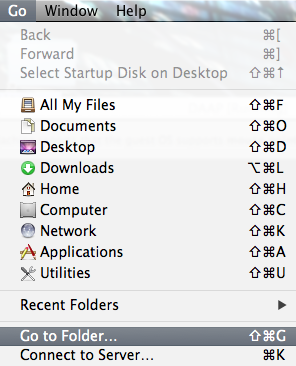
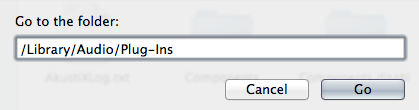
Once the folder opens AudioUnit plugins can be found inside the 'Components' folder and VST plugins in either the VST or VST3 folder.
AAX plugins are installed into a different location. See the Avid documentation for details.
The rest of this article needs improving to cover all sequencers.
MAC - LOGIC PRO X
Logic Pro X only supports AudioUnits.
You can use the Audio Unit Manager to see if a plugin has installed properly and to rescan plugins. See the Logic documentation for more information.
ABLETON
Note that Ableton supports AudioUnit and VST versions but you need to enable this in the Ableton Preferences. We recommend you use the AudioUnit version if you have a choice.
MAC - AUDIOUNITS ADVANCED
Try clearing the plugin cache. For audio units remove the cache file: ~/Library/Caches/com.apple.audiounits.cache.
Run auval on the Mac command-line for advanced diagnostics.
Comments
0 comments
Please sign in to leave a comment.